Settings
Manage Eventmie Pro global settings here.
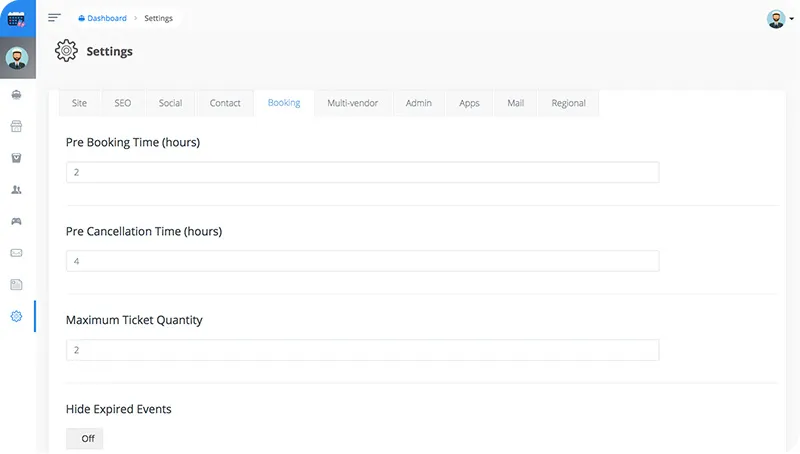
Site
Setup website brand identity.
| Setting Name | Type | Description |
|---|---|---|
| Site Name | alpha |
brand name |
| Site Slogan | alpha |
Tagline |
| Site Logo | image:jpg|jpeg|png |
Logo |
| Site Favicon | image:jpg|jpeg|png |
Favicon/icon |
SEO
Website SEO
| Setting Name | Type | Description |
|---|---|---|
| Meta Title | alpha |
short title explaining your business |
| Meta Keywords | alpha |
comma separated unique keywords that describe your website in-short |
| Meta Description | alpha |
short description of your website |
Social
About your social-media existence.
| Setting Name | Type | Description |
|---|---|---|
| Facebook Page Username | alpha |
Facebook page username only |
| Twitter Account Username | alpha |
Twitter account username only |
| Instagram URL | url |
Instagram profile URL |
| Linkedin URL | url |
Linkedin profile/company URL |
Contact
Contact details
| Setting Name | Type | Description |
|---|---|---|
| Address | alpha |
office address |
| Phone | numeric |
office phone number |
email |
office email | |
| Google Map Lat | numeric |
Google map coordinates Lat of your office address |
| Google Map Long | numeric |
Google map coordinates Long of your office address |
Booking
Bookings & Events global settings.
| Setting Name | Type | Description |
|---|---|---|
| Pre Booking Time | integer |
total hours before a customer can book an event |
| Pre Cancellation Time | integer |
total hours before a customer can request Booking Cancellation |
| Maximum Ticket Quantity | integer |
Max ticket quantity per booking |
| Hide Expired Events | bool |
Show/Hide expired events on event listing page |
Multi-Vendor
Switch between Multi-vendor mode
| Setting Name | Type | Description |
|---|---|---|
| Multi Vendor | bool |
turn on or off the multi-vendor option |
| Admin Commission | numeric|gte:0 |
set your commission in (%) percentage. (must be positive value) |
| Verify Email Before Login (v1.2) | enable/disable |
If enabled, users will need to verify email after signup |
| Publish Event After Admin Approval (v1.2) | enable/disable |
If enabled, event will go live only after Admin approval |
Admin
Admin panel content settings
| Setting Name | Type | Description |
|---|---|---|
| Admin Background Image | image:jpg,jpeg,png |
admin login page background image |
| Admin Title | alpha |
admin login page title & header title |
| Admin Description | alpha |
admin login page sub-title |
| Admin Loader | image:jpg,jpeg,png |
admin login page sub-title |
| Admin Icon Image | image:jpg,jpeg,png |
admin panel logo |
Apps
External Apps credentials
| Setting Name | Type | Description |
|---|---|---|
| Google Client ID | string |
Google OAuth client id |
| Google Client Secret | string |
Google OAuth client secret |
| Google Map Key | string |
Google Map Key |
| Facebook App Id | string |
Facebook OAuth app id |
| Facebook App Secret | string |
Facebook OAuth app secret |
| PayPal Client Id | string |
Paypal client id (New Rest API) |
| PayPal Secret | string |
Paypal secret (New Rest API) |
| PayPal Production Mode | bool |
Turn on/off production (real) mode payments |
Mail sending configurations
| Setting Name | Type | Description |
|---|---|---|
| Mail Driver | string |
Mail driver name e.g smtp |
| Mail Host | string |
Mail host e.g 127.0.0.1 |
| Mail Port | string |
Mail Port e.g 1025 |
| Mail Username | string |
Mail Username e.g testuser |
| Mail Password | string |
Mail Password e.g testpwd |
| Mail Encryption | list |
disable, SSL, TLS |
| Mail Sender Email | email |
Sender email e.g [email protected] |
| Mail Sender Name | string |
Sender Name e.g Eventmie |
Regional
Region-specific configurations.
| Setting Name | Type | Description |
|---|---|---|
| Timezone | list |
Choose your region specific timezone |
| Currency | list |
Choose your default currency |
Setting Default Timezone affects Events Date & Time that are storing in the database, they're converted accordingly.
- Suppose the default timezone is
America/Los_Angelesand a customer visiting the site fromIndia/Kolkata, then the customer will see the date & time according toIndia/Kolkatatimezone
{info} i.e Auto Timezone Conversion from
Server-sidetoClient-side& vice versa.
{success} Eventmie detects visitor's timezone and does all the conversions behind the scenes.
{warning} Please read the guidelines provided below each setting, and follow exactly mentioned, or else it may break down your site.