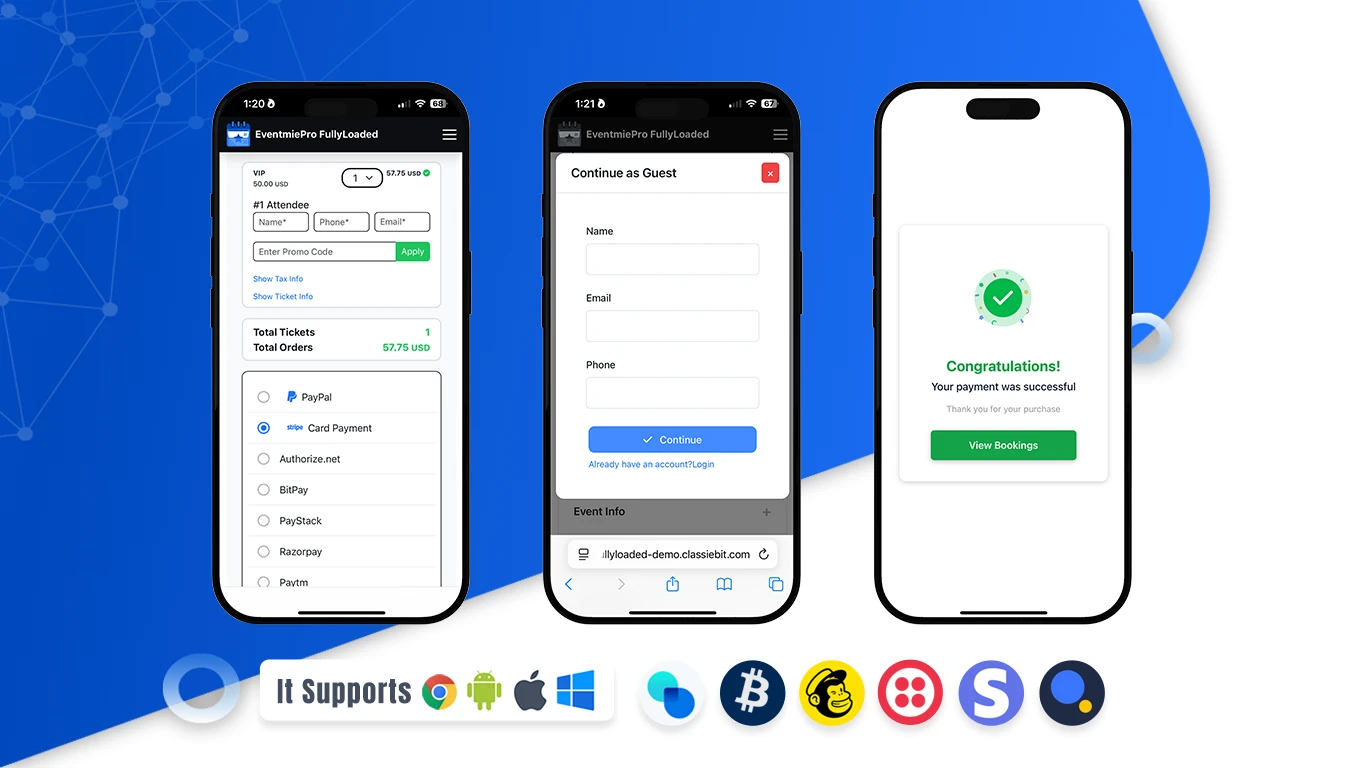
Guest Checkout
Make quick bookings without creating an account. Guest Checkout in the Eventmie Pro FullyLoaded app lets you reserve tickets in seconds with a simple, secure flow. Perfect for first‑time buyers and last‑minute plans, it reduces friction and boosts conversions while keeping the experience safe and convenient. Enjoy a clean, step‑by‑step journey: select your event and tickets, enter attendee details, add an email for your confirmation, and complete payment — no login required. Your QR‑code tickets and receipt arrive instantly so you can head straight to the event. It’s fast, mobile‑friendly, and built for a smooth checkout on any device.
How to book as a guest (Step‑by‑step)
- Select Event & Tickets: Open the app, pick your event, and choose ticket type and quantity.
- Enter Attendee Details: Add the attendee name and email to receive your tickets.
- Choose Guest Checkout: Continue without logging in or creating an account.
- Pay Securely: Confirm your order and complete payment.
- Get Your Tickets: Receive instant confirmation and QR‑code tickets by email and in‑app.